Android first release in preparation · local bookkeeping is ready
Three seconds to log it. One screen is one day. Every entry reads back.
A local-first bookkeeping app. Your ledger lives on your own device and exports out of it —
no sign-in, no ads, no third-party tracking; it does include anonymous product analytics
(Firebase + Umeng) that you can switch off in Settings.
The first release is Android local bookkeeping. Cloud sync and the family ledger are
built but not open yet — see release status.
3 secpull → amount → category
1 screen = 1 dayno dashboard
0 adsanalytics can be switched off
1Pull down on the home screen — the keypad opens in place
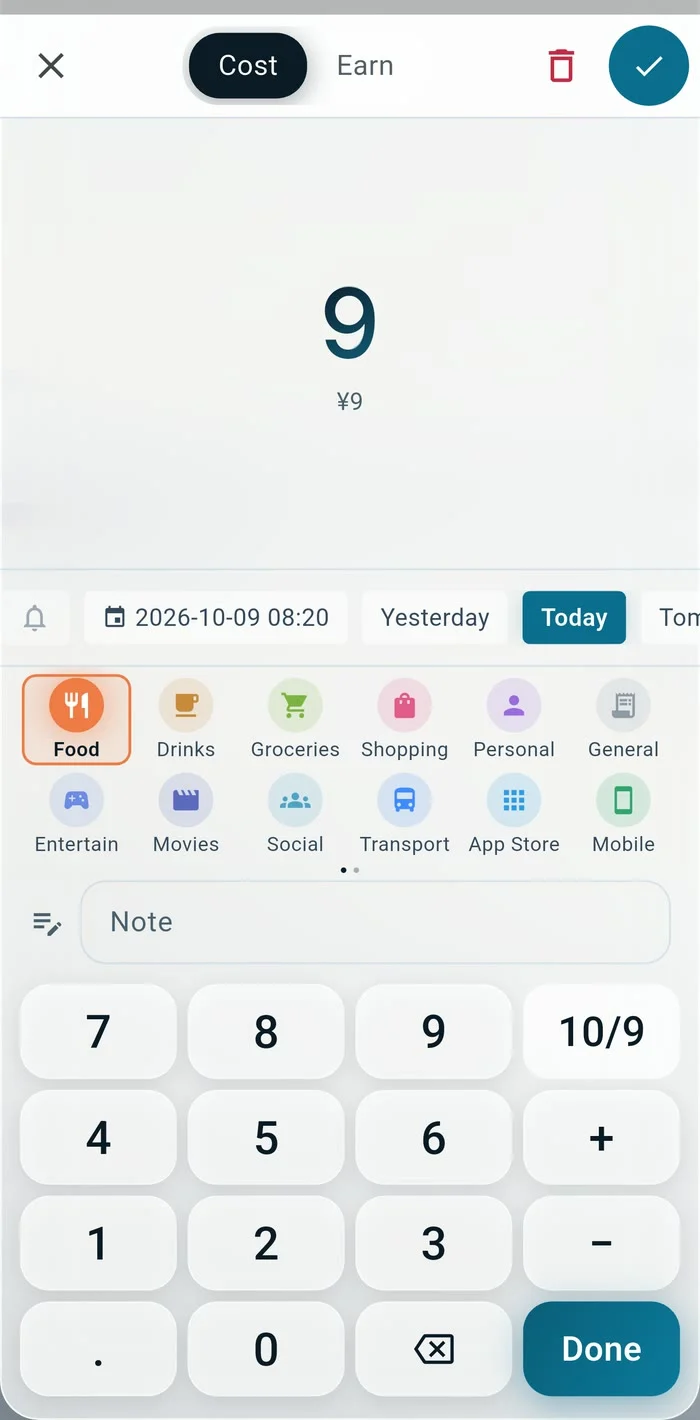
2Type the amount first, categories come second
3Tap a category, save — you stay where you were, ready for the next one
Real screens
Not a mockup — this is the app itself
The four screens below are captured from the app (light theme), unretouched.
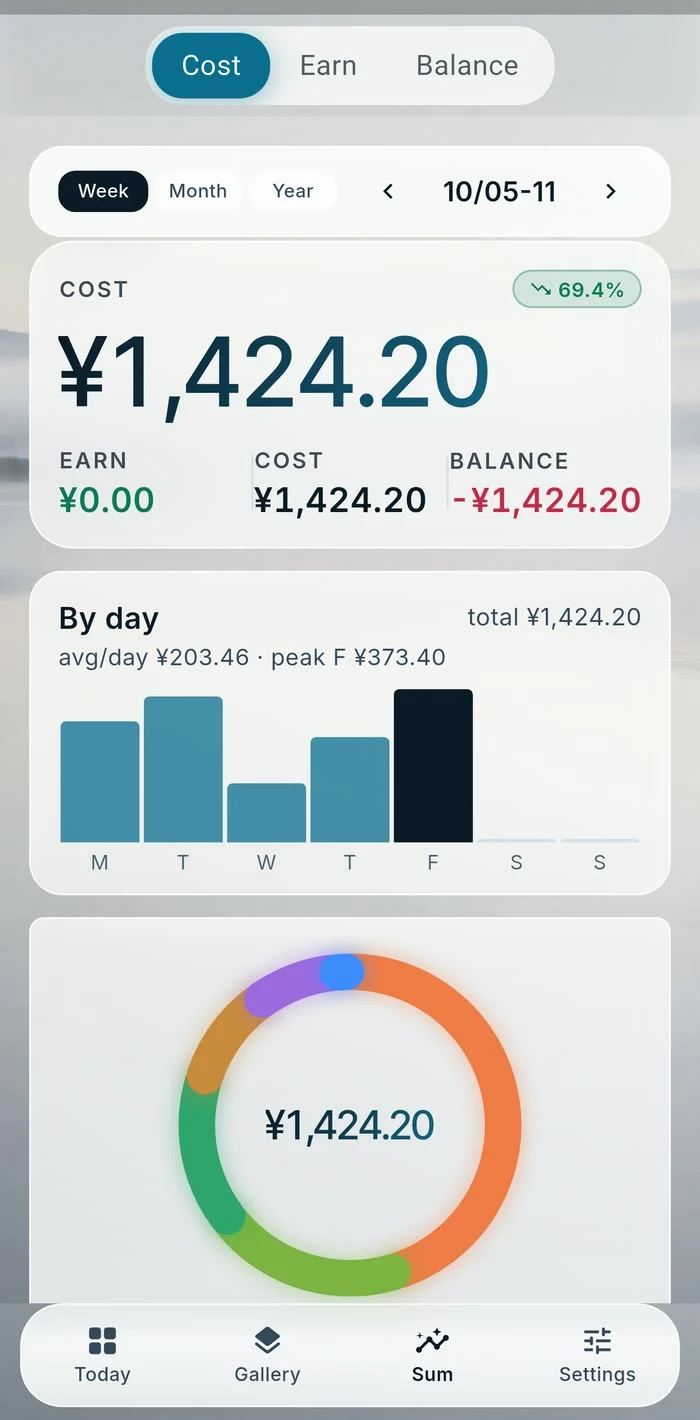
Amountsweek / month / year totals and shares
New entryamount first, one tap for a category
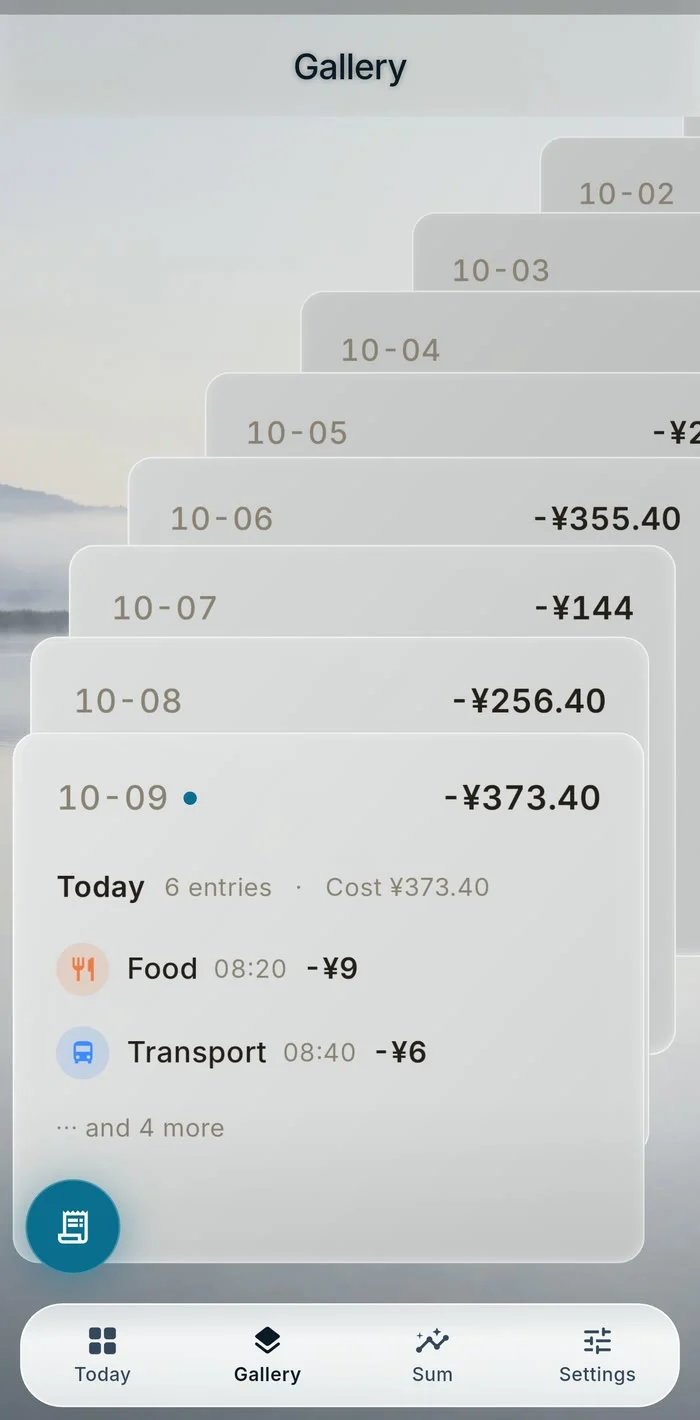
Galleryday by day, swipe across months
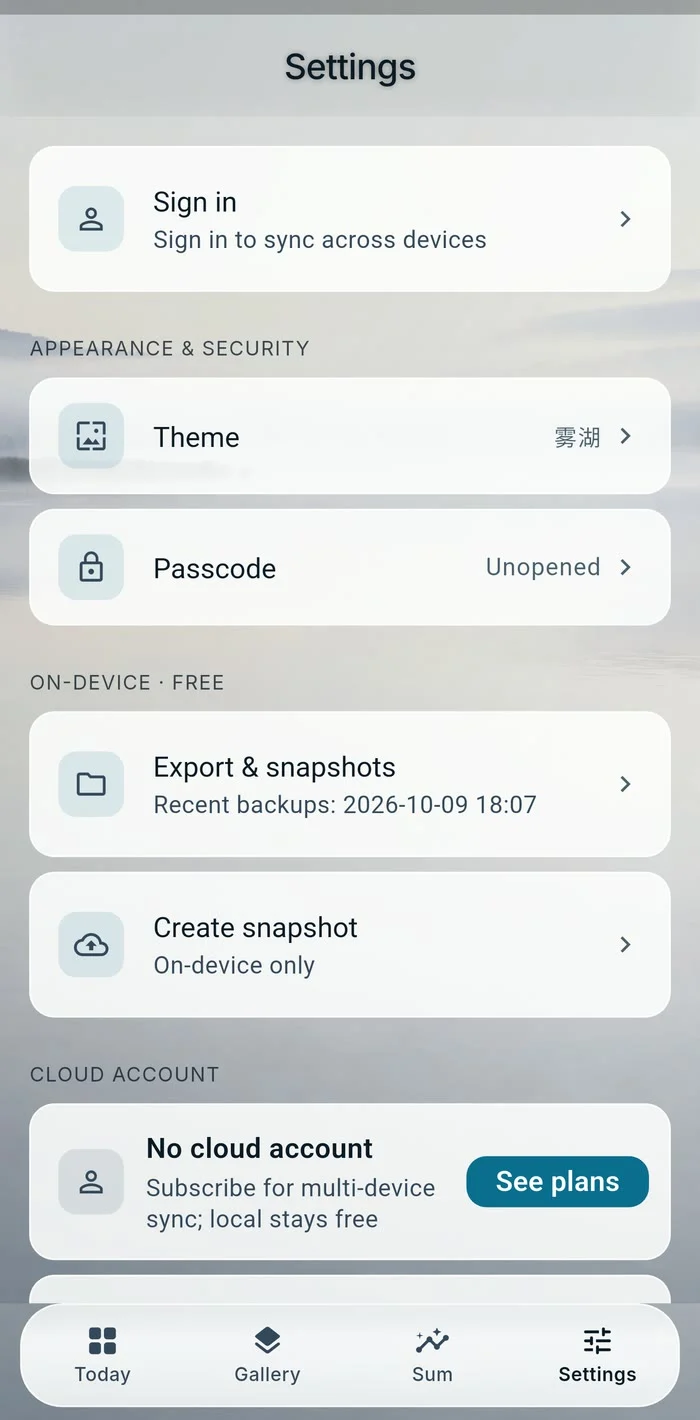
Data & backupexport CSV / JSON, take it with you
Three signatures
Logging an entry should be faster than opening an app
Bookkeeping tools die of two things: logging takes too long, and you never see what you logged.
Pull down and it is logged
Pull down on the home screen and the keypad unfolds in place: amount → category → save.
No second screen, no required fields, no "pick a ledger first". You stay where you were,
ready for the next entry.
amount before category
Swipe across days, up and down for weeks
Swipe sideways to change the day, vertically to change the week or month. Time is
two-dimensional on one axis, so you never have to open statistics and come back to
find that day.
two-dimensional time navigation
One screen, one day
Open it and today is there. No budget bar plus notification badge plus ad slot. Summaries
appear on one screen when you ask for them, and stay out of the way when you do not.
restraint is the point
Features
Everything a daily journal actually uses
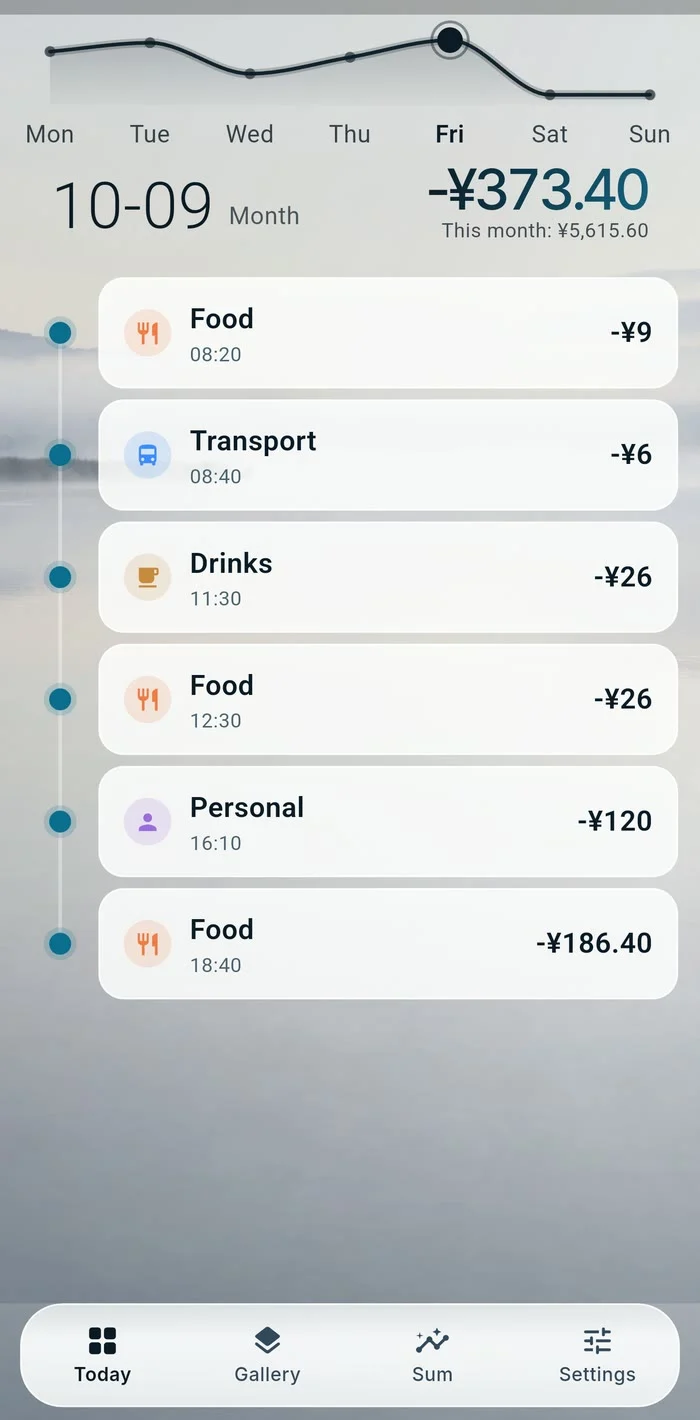
Glass timeline day view
A day is a vertical axis and every entry is a node lit at the moment it happened. Bigger amounts glow brighter.
Weekly, monthly, yearly totals
Income and spending stay separate, the net figure gives you the answer, and the category ring drills down to the entries behind it.
Album: a stack of paper cards
Browse past months like flipping a stack of cards — each one shows only the amount and the date until you open it.
Multiple currencies and rates
Entries can use different currencies, and conversion falls back through three layers:
built-in baseline → local cache → server refresh. It works offline, and we do not call it
a live market feed, because it is not one.
Editable, and deletions undo
Fix a mistake, undo a delete. The moment you confirm a deletion is not the moment it disappears for good.
Data and backup · local
Your ledger stays on this device by default
No sign-in, no network — still the complete product. Export and restore are yours to run and
never pass through our servers.
✓Sign in with Apple, no separate account or password.
✓Keep logging offline; changes upload once you are back on the network, and conflicts resolve by newest edit.
✓Only the fields sync needs: amount, category, note, time, currency, deletion flag and updated-at.
✓Delete the account and its server-side entries in one step.
✓Not available yet: it opens only after device and real-payment acceptance.
Family ledger · in development
One ledger, up to six people
One person pays, up to five more join the same ledger (six in total). Members do not need
their own subscription and do not create an account.
✓When you join, your personal entries merge into the shared ledger — server-side, so an offline device does not lose them.
✓When you leave or are removed, a copy of the shared ledger is moved back to your personal space. It is not wiped.
✓A lapsed subscription never locks data. It only blocks creating a family or inviting new members.
✓This is in-app ledger sharing, not Apple Family Sharing for purchases.
MePayer · family ownerholds the subscription
AMemberno subscription
BMemberno subscription
CMemberno subscription
DMemberno subscription
EMemberno subscription
Six members maximum, including the payer. Only the owner can remove members, reset the
invite code or disband the family; the owner must disband before leaving.
Release status
Straight answers before the download button
Below is what is actually switched on in the current build. Better to know the
edges now than to find them after installing.
AvailableLocal bookkeeping, editing and undoable deletes, weekly/monthly/yearly totals and net figures, album review, CSV / JSON export, on-device snapshots and restore, multi-currency with three-layer rate fallback. All covered by automated tests.
Not openCloud sync, family ledger and subscription. Built and covered by automated tests, but disabled by default in the first release build. Purchases open only after real-device and real-payment acceptance.
PendingFile share and export round trips on iPhone and iPad, and production deployment (HTTPS domain, database replica set, alerting, backup and restore drills).
To completeApp Store Connect materials: legal entity, support and legal URLs, territories and pricing, review account. Nothing on this site is a release commitment.
Pricing
Local bookkeeping is free; one family subscription covers six
No prices are printed here: price and period are always whatever the App Store product page shows before you confirm.
Available
Local bookkeeping
Free
Three-second entries, one day per screen
Weekly / monthly / yearly totals, album review
CSV export, whole-ledger JSON backup, on-device snapshots and restore
Multiple currencies with three-layer rate fallback
No registration, no ads, no third-party tracking (anonymous analytics can be switched off)
In development · not on sale
Family subscription
See the App Store (monthly / yearly)
Cloud sync: one ledger across your devices
Up to six people (one pays, five join free)
Members need no subscription and no registration
A lapsed subscription never locks or deletes entries
Auto-renewing, cancellable any time in Apple subscription settings
Once live, this card is replaced with the real App Store product details and localised prices.
FAQ
Three things you are probably asking
Where is my ledger stored?
In a local database on your device. With cloud sync off, entries are not uploaded anywhere and we cannot see any of them. You can export the whole ledger to CSV or JSON at any time.
What happens when I change phones?
There is no import: exported CSV / JSON files are for archiving and moving elsewhere. On-device snapshots only restore on the same device, so switching phones means waiting for cloud sync (not open yet).
Why can I not download it yet?
The first release is Android local bookkeeping and is in pre-release acceptance. Cloud sync and the family subscription will not open for purchase until they pass real-device and real-payment acceptance — we are not going to take money first and fix the experience later. Questions or pressure welcome at support@letskeep.com.
Tell me when it ships
Just an email — no account. We write on release day and use the address for nothing else.